Zlink Carplay Android
- 1.2
- Rating
- 50.00K
- Installs
- Free
- Price
 Analysis by App-foxy
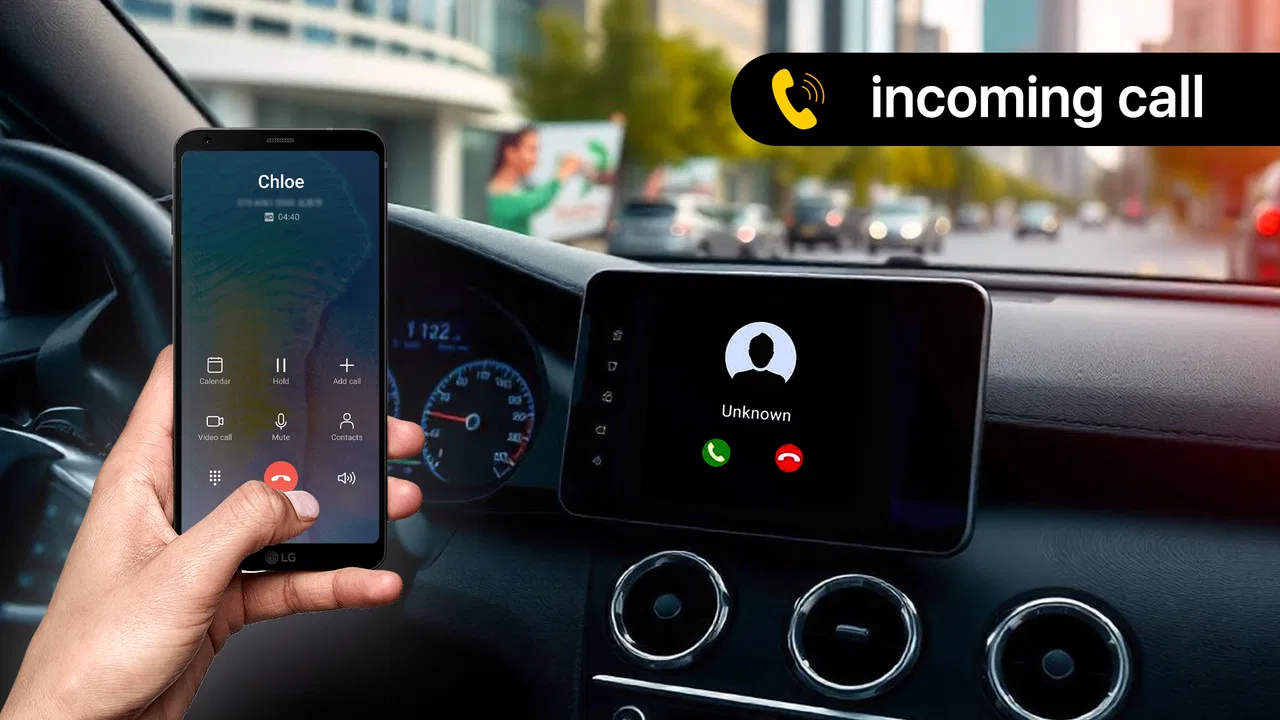
I approached Zlink Carplay Android as a practical interface experiment rather than a complete replacement for a car’s built-in system. It is a free app from Sayyara apps & games, listed in the Libraries & Demo section, and its purpose is to present an Android screen with a CarPlay-style appearance. That distinction matters: the app is mainly about the look and feel of a familiar in-car interface, not automatically about adding every function associated with official Apple CarPlay.
My first impression was that the concept is easy to understand. If you want a phone screen to resemble a dashboard-oriented CarPlay layout, this app gives you a focused starting point instead of asking you to build a custom arrangement from unrelated widgets. I can see why someone might try it for an older vehicle display, a demonstration setup, or a phone mounted near the dashboard.
At the same time, I would not treat the name as a promise that it turns any Android phone into a fully certified CarPlay receiver. The useful question is whether the interface style helps you reach the tools you already use with less distraction. For some people, that visual change may be worthwhile. For others, the standard Android interface, Android Auto, or the vehicle’s own system will remain the better choice.
You May Also Like

 Blood Strike: 2.5 Anniversary
Blood Strike’s Loadouts Turn Every Drop Into a Tactical Gamble
A close look at Blood Strike’s custom loadouts: how fast access to signature weapons reshapes its battle royale rhythm, rewards preparation, and narrows the gap between fights.

 Pandora - Music & Podcasts
Pandora’s Music Is Easy to Start, but Harder to Recover
Pandora’s strength is its low-effort path from a seed to a station. Its weak spot is how much confidence it asks you to place in connection, setup, and quiet recovery.

 8 Ball Pool
 Is Built on Rivalries, Rematches, and Routine
A close look at the rivalries, rematches, shared routines, and unanswered safety questions that turn a quick pool match into a persistent mobile community.

 Samsung Music
’s Quiet Strength Is Playing What You Already Own
Its reach comes less from spectacle than from dependable access to a personal library. That simplicity is both the app’s strongest retention engine and its ceiling.

 AccuWeather: Weather Radar
AccuWeather Review: A Quick, Clear Forecast for Everyday Decisions
For everyday plans, the best forecast is the one you can understand quickly. AccuWeather makes rain timing, radar, and local conditions easy to act on, with a few trade-offs.

 Hill Climb Racing
Why Hill Climb Racing Still Turns Crashes Into One More Run
A tiny car, a bumpy hill and one more upgrade: Hill Climb Racing keeps resurfacing because its simple chaos makes every near-miss feel personal.
More From Our News Desk
View All News


How the interface affects readability and navigation
The main strength of a CarPlay-style layout is its emphasis on a small number of recognizable destinations. In a car, I do not want to search through a dense phone screen while moving between traffic lights. A dashboard-inspired arrangement can make the screen feel more purposeful, especially when the phone is positioned at a distance and I need to identify an icon quickly.
That can help users who find ordinary Android home screens visually busy. A conventional launcher may contain social apps, games, shopping tools, news, and notifications all competing for attention. A driving-oriented presentation suggests a narrower task list. Even without changing the underlying phone, that shift can make the device feel less like a general-purpose computer and more like a control panel.
Still, readability depends on the phone, the display, and the person using it. A layout that looks comfortable on a large screen may feel cramped on a smaller one. Bright daylight can also reduce contrast, while nighttime use introduces the opposite problem: an overly bright display can become distracting. I would test the interface while parked, with the phone in its intended mount, before relying on it during a journey.
One useful habit is to decide in advance which functions deserve a place in your driving routine. I would avoid treating every available icon as equally important. If the interface lets me reach navigation, calls, or audio tools without hunting, that is a meaningful benefit. If I still need to leave the screen and dig through regular Android menus, the visual resemblance becomes mostly decorative.
The app is also more approachable for someone who already recognizes the CarPlay design language. Familiar shapes and placement can reduce the learning period, particularly when a passenger needs to help select something. However, familiarity should not be confused with universal clarity. People with low vision, color-vision differences, or difficulty distinguishing small symbols may need larger system text, stronger display contrast, or an alternative interface.
Navigation habits that make more sense in a car
I found the concept most useful when I treated it as a limited-access surface rather than a replacement for the phone’s entire operating system. Before driving, I would arrange the phone, unlock it, check the intended destination or audio choice, and then leave the device alone. This reduces the number of decisions required once the car is moving.
That workflow also exposes an important trade-off. A polished dashboard appearance can encourage confidence, but a familiar-looking interface may tempt people to interact with it more than they should. The safest advantage is not that the app makes touching the screen harmless; it is that a well-prepared layout may reduce the need to touch it at all.
For passengers, the experience is different. Someone sitting beside the driver may appreciate a simple, recognizable arrangement and can handle selections without asking the driver to reach across the cabin. For a solo driver, voice control or steering-wheel controls remain preferable whenever they are available through the phone and vehicle setup.
Motor and sensory considerations in everyday use
From an accessibility perspective, the most promising part of this app is its attempt to organize interaction around a vehicle context. Large, separated destinations are generally easier to target than tiny links scattered across a normal phone screen. That may benefit users with reduced finger precision, hand tremors, or difficulty making repeated accurate taps.
There is a limit, though: the app cannot change the physical size of the phone, the quality of the touchscreen, or the position of the device in the car. A person with limited reach may struggle if the mount is too far away. Someone with joint pain may find repeated tapping uncomfortable even when the icons appear clear. I would set the mount within easy reach before starting a trip, but not so close that it becomes a dangerous visual or physical obstruction.
Touch interaction is also affected by movement. A tap that is easy to make while parked can become unreliable on a rough road. That is why I would not evaluate the interface only from a desk. The real test is whether I can understand the current screen at a glance and complete an occasional action without prolonged concentration. If a task requires several precise taps, this is not an accessibility solution by itself.
For users who are sensitive to bright screens, I would keep the display at a comfortable level and use the phone’s own display settings where possible. The app’s CarPlay-like presentation may feel cleaner than a crowded home screen, but it should not be assumed to provide specialized low-vision modes, audio descriptions, switch access, or other assistive features. Those needs are better addressed through Android’s built-in accessibility tools and compatible hardware.
Users with hearing loss may also need to think beyond the visual layout. A screen can show a destination or media control, but it does not automatically solve the problem of hearing navigation prompts, calls, or alerts inside a noisy vehicle. I would consider the phone’s text and visual notification options, and I would avoid depending on sound alone for an important instruction.
There is another sensory issue that is easy to overlook: motion and divided attention. A dashboard-style interface can look calm, but it still presents moving information if navigation or media content is active. Anyone who experiences discomfort from visual motion should test the setup while parked and keep the display as static and simple as possible during travel.
Who may find the presentation helpful
I can imagine this app helping a driver who feels overwhelmed by a cluttered Android home screen, a passenger who wants a clearer way to operate a mounted phone, or a hobbyist building a simple demonstration dashboard. It may also suit someone using an older Android device where a dedicated CarPlay-like presentation is more appealing than the default launcher.
It is less suitable for a person who needs guaranteed compatibility with a particular vehicle, dependable hands-free control, or advanced accessibility support. In those situations, the better route may be the vehicle manufacturer’s system, an established Android Auto setup, or a launcher specifically designed around the user’s motor and sensory needs. The familiar appearance here is useful, but it should not be mistaken for a complete assistive driving platform.
Situational access: where the app fits and where it does not
The clearest everyday scenario is a short trip in an older car. I could place an Android phone in a secure dashboard mount, prepare the screen before pulling away, and use the CarPlay-style arrangement as a cleaner visual starting point. The benefit would be organization: fewer unrelated phone distractions and a more vehicle-focused presentation.
That scenario works best when the phone is already configured and the driver is not trying to discover functions on the road. I would choose the destination, set the audio, connect any equipment I normally use, and confirm that the screen is visible before starting. If the app requires me to repeatedly return to standard Android menus, I would stop treating it as a driving interface and use a more direct alternative.
A second use case is a parked demonstration. Someone comparing dashboard concepts, teaching a new driver where common controls might appear, or testing a phone mount could use the app as a visual mock-up. Here, the lower stakes make the interface style more valuable because the goal is presentation and orientation rather than continuous operation in traffic.
It may also be useful for a passenger who wants to operate media or navigation while the driver concentrates on the road. The passenger can evaluate whether the icons are understandable from an angle and whether the screen remains readable without holding the phone directly in front of the face. That kind of testing is more revealing than simply opening the app indoors.
On the other hand, I would skip it for a long journey if I had not already tested the complete setup. A free interface app can be appealing, but travel reliability depends on more than the visual layer. The phone mount, display brightness, network connection, audio routing, vehicle controls, and the behavior of the underlying Android apps all affect the result. The app cannot remove those dependencies.
It is also not the right choice for anyone expecting official Apple integration simply because the interface resembles CarPlay. The store summary describes a mirror-link app with a CarPlay interface style, so I read it as a presentation and mirroring-oriented tool. If you need a certified connection between an iPhone and a compatible vehicle system, you should use the official solution supported by that hardware rather than relying on a similar-looking Android screen.
How it compares with familiar alternatives
Compared with the ordinary Android launcher, this app has a narrower visual purpose. A regular launcher usually gives faster access to every installed app and deeper customization. That is better when I want a general phone workspace. The CarPlay-style approach is better when I want the screen to suggest a smaller, driving-related set of actions.
Compared with Android Auto, the distinction is more important. Android Auto is designed as a broader vehicle integration experience when the phone and car support it, while this app focuses on a CarPlay-like interface and mirror-link presentation. If my car already supports Android Auto, I would normally start there because the integration is more directly tied to the vehicle. I would consider this app when I want to experiment with a visual alternative or when my setup does not offer that route.
Compared with a dedicated aftermarket head unit, the app is cheaper because it is free, but the phone remains the center of the experience. A head unit may provide a larger, more stable display and physical controls, while this approach depends on the phone’s screen and mount. The trade-off is obvious: no extra hardware purchase, but also no guarantee of the same physical usability.
Another alternative is a highly configurable Android launcher. That may be the better option for users who need unusually large icons, a specific color scheme, or a carefully simplified home screen. The advantage of this app is its ready-made CarPlay-inspired identity; the advantage of a custom launcher is control. I would choose based on whether I value quick setup or precise adaptation.
Remaining barriers and practical limits
The app’s low average rating of 1.2 from around sixty-seven ratings is a reason to approach it with realistic expectations. It has passed fifty thousand installs, so it has attracted substantial curiosity, but popularity does not prove that it will work smoothly with every phone or vehicle arrangement. I would install it as a test, not as the only plan for an important trip.
The version shown is 1.8, and the app was released on February 15, 2024. It supports Android 7.0 and newer, which makes it relevant to some older devices, but age alone does not guarantee a good experience. Older hardware may have a smaller display, slower response, weaker brightness, or limited support for the other apps that a dashboard workflow depends on.
Because it is rated for Everyone, the app is presented as suitable for a broad audience. That does not mean every person will find the interaction accessible. Age ratings describe content suitability, not whether the interface works for low vision, limited dexterity, hearing differences, cognitive load, or motion sensitivity. I would judge those factors through a short, hands-on test in the actual vehicle environment.
Mirroring and interface-style tools can also create confusion about what is being controlled. If I tap a navigation or media destination, the underlying phone application still determines how that task behaves. The dashboard appearance may make access feel more unified, but it does not necessarily make every third-party app equally easy to read or operate.
My strongest practical tip is to create a pre-drive checklist: secure the phone, set brightness, start the intended audio or route, confirm the screen orientation, and place the device where it can be seen without blocking the road. This is not glamorous, but it addresses more real-world friction than repeatedly changing the interface after the car is moving.
I would also keep an alternative ready. If the app does not respond as expected, the phone’s normal navigation or the vehicle’s built-in controls should remain available. A driver should never troubleshoot an unfamiliar screen while moving. For users with accessibility needs, a passenger can help with the initial setup, but the final arrangement should still minimize the driver’s need for precise touch input.
An inclusive verdict for the right kind of user
After looking at the app through readability, motor access, sensory comfort, and real driving conditions, I see a focused but limited product. Its value lies in giving an Android phone a more dashboard-like presentation, especially for people who dislike a busy home screen or want to explore a CarPlay-inspired arrangement without paying for extra software.
The best reason to try it is visual simplification, not a promise of complete vehicle integration. That makes it potentially helpful for parked demonstrations, passenger-operated setups, and carefully prepared short trips. It can also give users a clearer starting point than a standard launcher, provided the phone is mounted securely and the underlying apps behave well.
I would recommend testing it to anyone with an older Android device who wants a free experiment and understands the difference between a styled interface and official CarPlay support. I would not recommend depending on it blindly for critical navigation, demanding accessibility requirements, or a vehicle setup that already offers a reliable integrated alternative.
The developer, Sayyara apps & games, has made a concept that is easy to recognize, but the low rating suggests that the real-world experience deserves caution. My final advice is simple: try it while parked, judge the icon clarity from the driver’s position, test it with your own mount and audio routine, and keep interactions to a minimum once you are moving. For the right situation, the free price makes that experiment reasonable; for a dependable daily driving system, I would compare it carefully with Android Auto, the car’s native interface, or a purpose-built launcher before making it part of every journey.
In short, I see this as a visual accessibility aid in a narrow sense: it may reduce clutter and make a phone feel more organized, but it does not replace the broader accessibility features, physical controls, or integration offered by more established solutions. If that boundary matches what you need, it is worth exploring. If you need certainty, customization, or hands-free reliability, another option will likely serve you better.
FAQs for Zlink Carplay Android
01What is Zlink Carplay Android, and how does it work?
Zlink Carplay Android is an app designed to integrate your smartphone with your car's infotainment system, allowing you to access apps, music, navigation, and more directly from your car's display. It works by establishing a connection between your phone and car, providing a seamless user interface optimized for driving.
02Is Zlink Carplay Android compatible with all vehicles?
Zlink Carplay Android is compatible with many vehicles that support Android Auto or Apple CarPlay. However, it's essential to check if your car’s infotainment system is compatible with the app. Compatibility may vary based on the car model and the system's software version.
03What features does Zlink Carplay Android offer?
Zlink Carplay Android offers various features, including hands-free calling, voice commands, music streaming, navigation, and access to apps like Spotify and Google Maps. It aims to provide a safer driving experience by allowing users to keep their focus on the road while accessing their phone's essential functions.
04Are there any subscription fees or in-app purchases with Zlink Carplay Android?
While the initial download of Zlink Carplay Android might be free, some features may require a subscription or in-app purchases for full access. It's recommended to review the app's pricing details on the Google Play Store or Apple App Store to understand any potential costs involved.
05How do I troubleshoot connection issues with Zlink Carplay Android?
If you encounter connection issues with Zlink Carplay Android, try restarting both your smartphone and car infotainment system. Ensure your phone's software and the app are up to date. Check your USB or Bluetooth connections, and consult the app’s support resources or your vehicle’s manual for further assistance.
Pros
- Seamless integration with car systems.
- User-friendly interface with easy navigation.
- Supports a wide range of apps.
- Wireless connectivity options available.
- Efficient voice command functionality.
Cons
- Limited compatibility with older car models.
- Occasional connectivity drops.
- Requires frequent updates for new features.
- Some features locked behind paywall.
- Battery drain can be an issue.

Zlink Carplay Android
Gallery